Use this file to discover all available pages before exploring further.
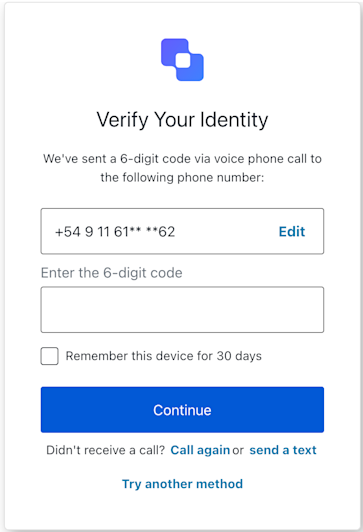
The MfaVoiceChallenge class implements the mfa-voice-challenge screen functionality. This screen is displayed when the user needs to enter a code received via voice call to verify their identity.
This method changes the display language of the Universal Login page.
Example
import MfaVoiceChallenge from '@auth0/auth0-acul-js/mfa-voice-challenge';const mfaVoiceChallenge = new MfaVoiceChallenge();mfaVoiceChallenge.changeLanguage({ language: 'fr',});
This method navigates to the screen where the user can select a different phone number.
Example
import MfaVoiceChallenge from '@auth0/auth0-acul-js/mfa-voice-challenge';const mfaVoiceChallenge = new MfaVoiceChallenge();await mfaVoiceChallenge.pickPhone();
This method requests a new voice call with a verification code.
Example
import MfaVoiceChallenge from '@auth0/auth0-acul-js/mfa-voice-challenge';const mfaVoiceChallenge = new MfaVoiceChallenge();await mfaVoiceChallenge.resendCode();
This method switches the verification method to SMS.
Example
import MfaVoiceChallenge from '@auth0/auth0-acul-js/mfa-voice-challenge';const mfaVoiceChallenge = new MfaVoiceChallenge();await mfaVoiceChallenge.switchToSms();
This method allows the user to try another MFA method.
Example
import MfaVoiceChallenge from '@auth0/auth0-acul-js/mfa-voice-challenge';const mfaVoiceChallenge = new MfaVoiceChallenge();await mfaVoiceChallenge.tryAnotherMethod();